Polymorphic Claude Code Skills: Separate the Stable Process from Concrete Implementations in Your SKILL.md
You write a tidy SKILL.md. It does one thing well, so you ship it. Then an edge case arrives, reasonable, so you handle it in-line. Then another, then a third, with a shape the first two didn't anticipate. Each addition is justified on its own — so you keep adding: if this, then that… but when X… unless Y… A month later, the skill's one clear job is buried under conditionals. If that sounds familiar, it should. It's a 400-line method with tons of boolean flags. We learned not to write those in code. Somehow, we keep writing them in Claude skills. And the bloat isn't only a readability problem — it's a runtime cost. The SKILL.md file loads in full every time the skill fires. So a skill carrying rarely-used branches spends tokens and the model’s attention on scenarios that have nothing to do with the task in front of it.
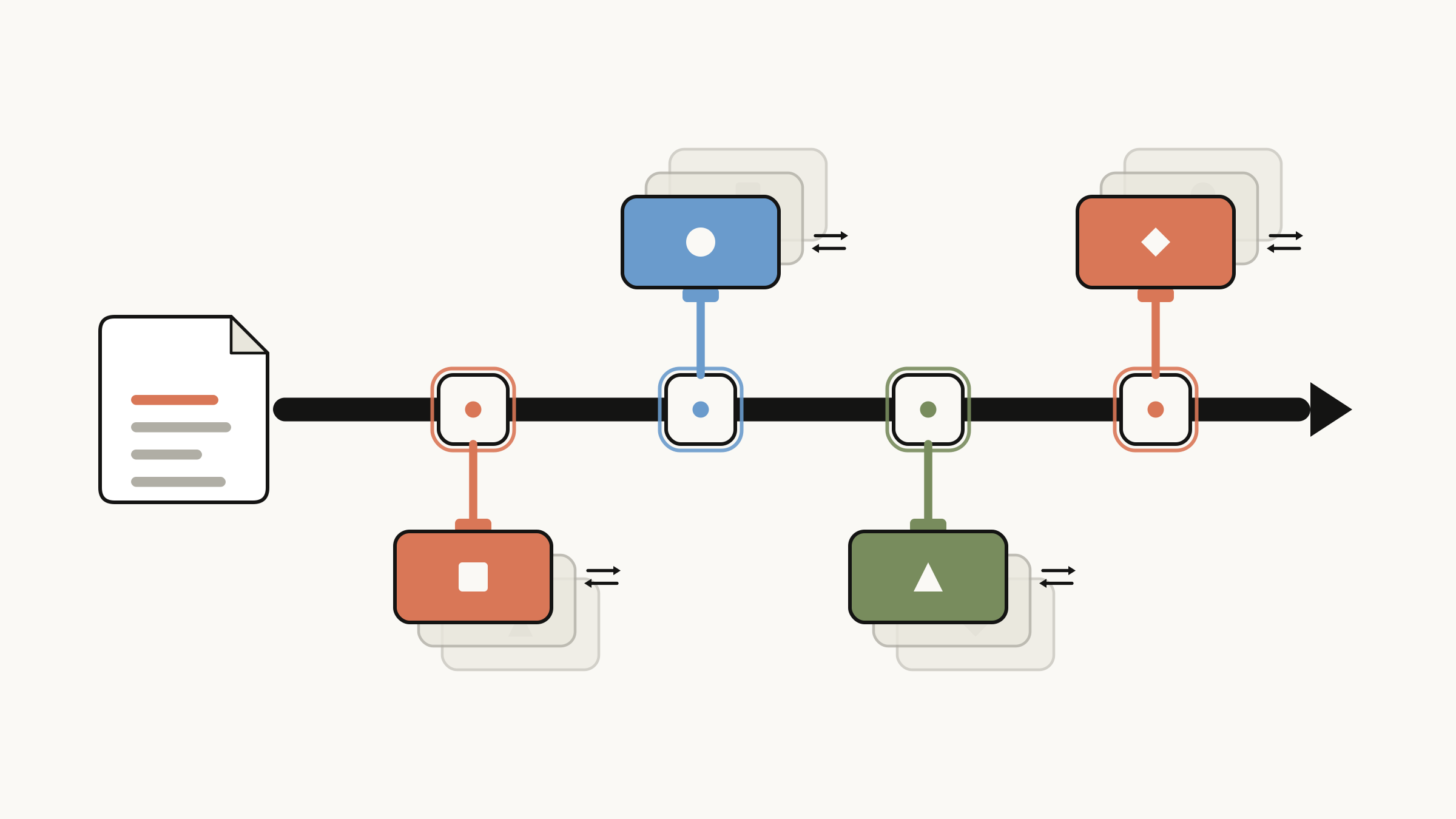
Polymorphic Claude skill - the concrete implementation of a skill or a step in a skill can be delegated to a new file
A Claude skill is a program
Here's the reframe that fixes it: a skill is a program, and SKILL.md is not where implementation details usually go. Every non-trivial skill contains two kinds of content that change at completely different rates:
- The process or logic: what the skill is for, its goal, and the steps to get there. This rarely changes. The job of "summarize a branch for a reviewer" is stable.
- The implementation — how a given step is actually carried out. This changes constantly. The exact shape of the output, where you read the ticket from, and how chatty the interaction is.
When you mix the two in one file, every change to the volatile part forces you to edit — and risk breaking — the stable part. The fix is the oldest one we have: separate them. Keep the process in SKILL.md. Push each implementation into its own file under the resources folder. Engineers will recognize this as the Strategy Pattern and Template Method Pattern.
Splitting Claude skill files by responsibility
The rule of thumb is simple: SKILL.md owns the goal, the steps, and the decision about which implementation to use. It must never own the how. The how usually lives in the resources folder.
Take a skill that summarizes a pull request. Its job breaks cleanly into two steps — analyze the branch to figure out what changed, then summarize and format that for a human. The analysis is fixed. The formatting is exactly the part everyone wants to be different. So that's the part we pull out:
pr-summary/
├── SKILL.md
└── resources/
    ├── output-bullet-list.md
    └── output-sentences.md
The whole trick is in that structure. The moment SKILL.md stops describing formatting and starts choosing between formatters, it stops growing whenever someone wants a new output flavor.
It also stops eating your context window. SKILL.md now holds only the selection table; the actual instructions live in resource files that get read only when their strategy is chosen. The model pulls in the one implementation the task needs and never loads the others. The skill can grow to a dozen strategies while the tokens spent on any single run stay flat.
Example: Writing a pull request summary skill where the output content or style changes
Here's the actual SKILL.MD, starting with two output strategies:
---
name: pr-summary
description: Use when human needs a PR summary, branch summary, or readable description of changes for a code reviewer
tools: Grep, Glob, Read
---

Analyze current changes in a Git branch and summarize them. Keep summary short and concise.

## What
- Write the goal the changes in the PR are trying to achieve
- Mention key files or methods that are involved in the PR, but do not go deep in
  details. Only focus on things the reviewer might need to know
- Mention key decisions or implementation details if they are required to
  understand code better

## Output

Select a strategy based on the rules below, then **Read the file listed under
`implementation:` and follow its formatting instructions exactly.**

**Strategy selection priority:** explicit `output=` arg > natural language in request > default.

### Strategies:

#### Bullet List
- default: true
- arg: `output=bullet-list`
- implementation: `resources/output-bullet-list.md`
- rules: Default, `output=bullet-list`, or when human specifies bullet list

#### Sentences
- default: false
- arg: `output=sentences`
- implementation: `resources/output-sentences.md`
- rules: `output=sentences`, or human specifies sentences, prose, or paragraphs
Three things are worth pausing on.
The selection priority line: `explicit output=argument > natural language > default`. That's the "context decides which strategy" rule written in plain English.
Each strategy is a single table row that points to a resource file. It declares when to use a formatter, never how the formatter works.
SKILL.md says nothing about formatting. No bullet characters, no sentence counts, no diagram rules. It picks and delegates. That's all.
The how lives in the resource files, each one small and focused. As an example, output-bullet-list.md is just this:
Format PR summary and show this info:
- A short phrase illustrating the goal of the PR
- The key file changes and method changes
- The key decisions that were made and why

Keep summary brief and concise. Goal is to assist human reviewer understand
the context for this PR.
And output-sentences.md deliberately does the opposite — prose, no file list:
Format PR summary in 2-3 sentences focusing on the changes introduced in the PR
and on the main key decisions if any. Do not mention changed files here, they are
an implementation detail.
Seeing the skill in action
Let's run it against a real change. We have a service that watches aircraft traffic and raises an alert when two aircraft breach a minimum separation. A branch raises those minima from 5 NM / 1,000 ft to 6 NM / 2,500 ft. A reviewer needs to get up to speed fast.
Ask for the default bullet output — you just type a plain prompt into Claude Code:
> Create PR summary
And the output will be:
PR Summary:

Update default minimum separation thresholds from 5 NM / 1000 ft to 6 NM / 2500 ft.

Key changes:
- application.properties — configured values updated to 6.0 NM and 2500 ft
- DetectionApplicationConfig.java — Java fallback constants DEFAULT_HORIZONTAL_THRESHOLD_NM
  and DEFAULT_VERTICAL_THRESHOLD_FT updated; Javadoc revised
- SeparationThresholds.java — Javadoc defaults updated
- DetectionApplicationConfigTest.java — default-fallback assertions updated to assert
  6.0 / 2500 (tests that explicitly configure a value are unchanged)
- InfringementDetectorTest.java — test thresholds and all boundary-position coordinates
  updated (e.g. "just below" positions shifted from 4.9 NM / 999 ft to 5.9 NM / 2499 ft)
- SeparationThresholdsTest.java — "above default" test case updated to 3000 ft

Key decisions:
- Tests that configure an explicit value were left unchanged — they test wiring
  correctness, not default values
- InfringementDetectorTest boundary coordinates were recalculated to match the new
  thresholds so the tests stay accurate living documentation of deployed behavior
Now ask for prose instead — same skill, you just phrase it differently:
> Create PR summary using sentences
And the same analysis comes out shaped for a different reader:
PR Summary:

This PR updates the default minimum separation thresholds used by the infringement
detection service from 5 NM / 1000 ft to 6 NM / 2500 ft. Both the externalized
configuration values in application.properties and the Java fallback constants in
DetectionApplicationConfig were updated, along with all Javadoc references. Tests that
assert on the default fallback path were updated to match the new values, and boundary
positions in InfringementDetectorTest were recalculated so they continue to accurately
represent behavior at the new thresholds.
Extending the skill
Bullets and prose are fine until a change spans several classes, and a reviewer would trade a lot for a picture. We want a detailed format with a diagram. Let’s go ahead and add a new output strategy/implementation. First, we add a new resource file, resources/output-detailed-with-diagram.md, describing the richer summary format:
Format PR summary and show this info:
- A short phrase illustrating the goal of the PR
- All the file changes grouped by package
- The key decisions that were made and why
- Visual diagram

At the end add an ASCII diagram to help the reader understand how the changes work
together. Use an activity or workflow diagram, whichever fits. Keep it readable and
focused on the main flows, not implementation detail.
Then, we also have to add a new entry for this new output implementation in the SKILL.md file.
#### Detailed with Diagram
- default: false
- arg: `output=detailed`
- implementation: `resources/output-detailed-with-diagram.md`
- rules: `output=detailed`, or human specifies detailed summary, diagram, or visual.
  Useful for complex changes that span multiple classes or modules.
That's the entire change. The `What` section, the selection logic, and the two existing strategies were not touched. This time, you can name the strategy explicitly with an argument:
> /pr-summary output=detailed
And this time we got a far more detailed PR summary, including a diagram of the changes.
PR Summary:

Update default minimum separation thresholds from 5 NM / 1000 ft to 6 NM / 2500 ft.

Key changes by package:

resources/
- application.properties — configured values updated to 6.0 NM and 2500 ft

application/
- DetectionApplicationConfig.java — fallback constants and Javadoc updated

domain/
- SeparationThresholds.java — Javadoc defaults updated

test/
- DetectionApplicationConfigTest.java — default-fallback assertions updated; explicitly
  configured tests left unchanged
- InfringementDetectorTest.java — threshold and boundary coordinates recalculated
- SeparationThresholdsTest.java — "above default" case updated to 3000 ft

Diagram:

application.properties          DetectionApplicationConfig         SeparationThresholds
──────────────────────          ──────────────────────────         ────────────────────
horizontalThresholdNm=6.0  ───►  if (null) use DEFAULT = 6.0  ───►  record(6.0, 2500)
verticalThresholdFt=2500   ───►  if (null) use DEFAULT = 2500              │
                                          │                                ▼
                                          │                     InfringementDetector
                                          │                     detects pair when:
                                          │                       hSep < 6.0 NM
                                          │                       AND vSep < 2500 ft
                           ┌──────────────────────────────┐
                           │        Tests affected        │
                           │──────────────────────────────│
                           │ DefaultFallback assertions   │  ← updated
                           │ InfringementDetectorTest     │  ← boundary coords recalculated
                           │ SeparationThresholdsTest     │  ← "above default" updated
                           │ Explicit-config tests        │  ← unchanged (test wiring)
This is the part that matters. You extended the skill's behavior by adding a file, not by editing the engine. New implementation, same interface, every existing caller unaffected. That's polymorphism — and it's why these skills survive contact with real projects instead of accumulating scar tissue.
When to use a polymorphic Claude skill
The rule is simple: reach for polymorphic skills whenever you want to enforce a process, but let the steps vary. In practice, that covers a lot of what we actually build:
PR or change summaries — bullets, prose, detailed-with-diagram, release notes.
Reading ticket details — from Jira, a GitHub issue, a local file, a Word doc, or a direct human prompt.
Human-in-the-loop interactions — a terse confirm-and-go style versus a conversational, interview-like one.
Diagramming — Mermaid, ASCII, PlantUML, pick your renderer.
AI code review — shallow pass, deep review, security-focused, or clean-code-focused, selected per situation.
Treat Claude skills like production code
Claude skills are code you'll maintain, extend, and hand to other people. You need to apply the same discipline that you use when writing maintainable production code. Find the part that's stable and protect it. Find the part that varies and make it swappable. The line between a skill that survives real projects and one you rewrite every week is the same line that separates good code from bad: keep the what stable, and make the how swappable.