Why Claude Code Gets Worse the Longer You Use It — And How to Fix It
More Context Isn't Always Better: The Case for Keeping Claude Code Sessions Under 100k Tokens
Claude models keep getting smarter. We now have Claude Sonnet 4.6 and Opus 4.7 with a 1M-token context window, complementing the original models with their 200k default. But just because a model can hold a million tokens doesn't mean it will perform evenly across all of them — particularly on the kinds of demanding reasoning tasks that matter most in enterprise software development.
In fact, both Anthropic's engineering research and the Chroma Context Rot study have shown that reasoning performance degrades as the context window fills up — and that this degradation hits coding tasks especially hard. Based on the data and my practical experience using Claude Code in enterprise Java systems, 80k-100k tokens seems to be the optimal ceiling for high-stakes reasoning work before precision reliably drops off.
What the Research Shows
The Chroma technical report — Context Rot: How Increasing Input Tokens Impacts LLM Performance — evaluated 18 LLMs including Claude Sonnet 4, GPT-4.1, and Gemini 2.5. Their core finding: models do not process context uniformly. Performance grows increasingly unreliable as input length grows, even on deliberately simple, controlled tasks. The key insight in their methodology is that they held task complexity constant while varying only the input length. This isolates context length itself as the variable — ruling out the usual confound of "longer inputs = harder problems."
The most relevant finding for developers is the sharp distinction between two types of tasks:
Retrieval tasks — locating a known piece of information: finding a function signature, tracing a config value, grepping for a symbol. Direct, pattern-matching work.
Cognitive tasks — reasoning, inference, and synthesis over ambiguous or distributed information: debugging a race condition, evaluating architectural trade-offs, understanding how a refactor propagates across a codebase.
These two categories respond very differently as context grows. Retrieval tasks degrade gently. Cognitive tasks fall off sharply. The study's controlled setup — varying only input length, not task difficulty — makes the cause unambiguous: it is the length itself, not the complexity, that erodes performance on reasoning-heavy work.
The Graph That Should Change How You Work
Below is the key chart from the Chroma study, showing performance by needle-question similarity as context length increases (arXiv haystack):
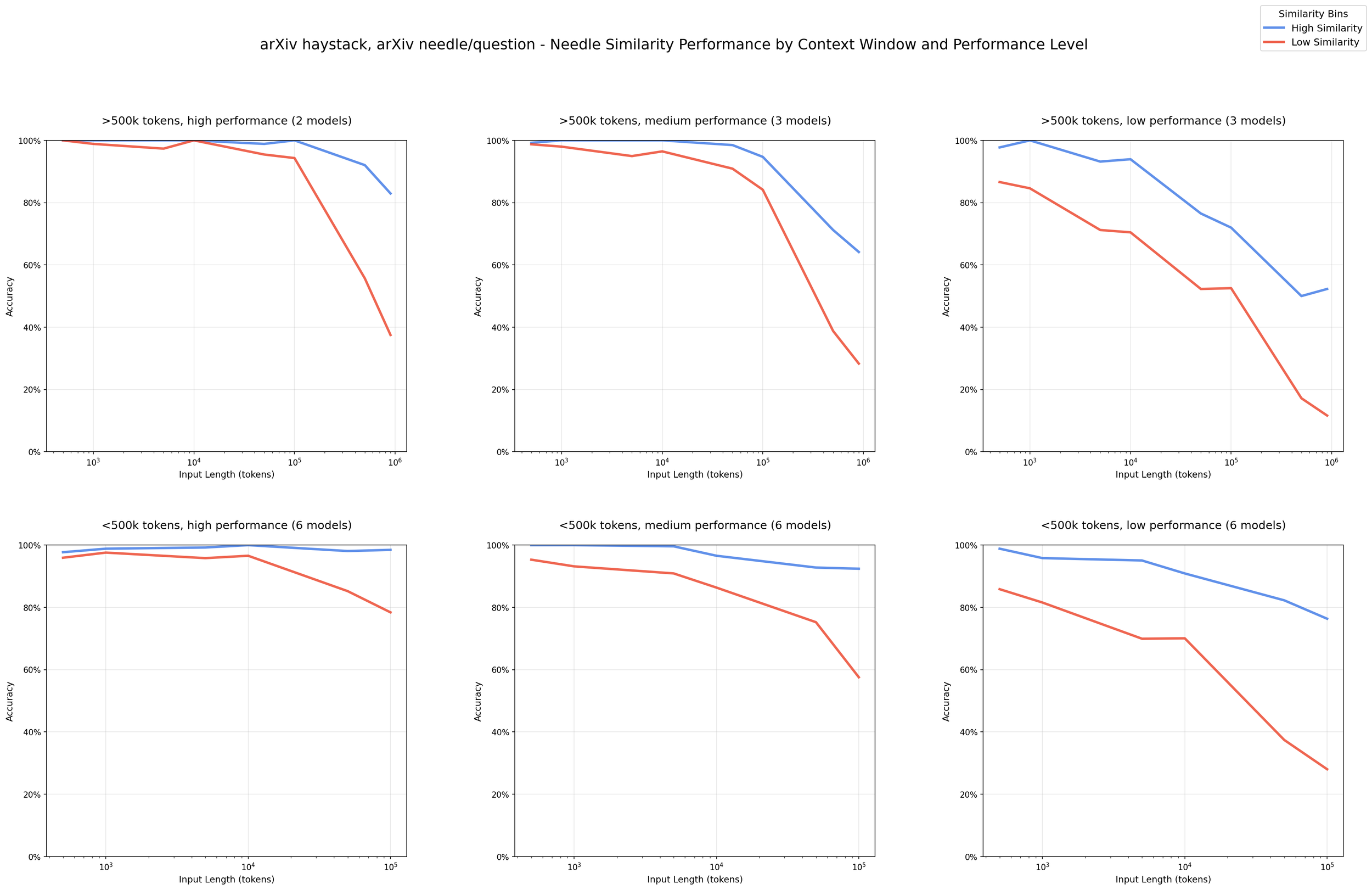
Blue: high-similarity retrieval tasks. Red: low-similarity reasoning, analysis, and coding tasks. Past 100k tokens, cognitive tasks (including coding) fall off sharply while retrieval holds up. Source: Chroma Context Rot report (https://www.trychroma.com/research/context-rot)
What This Means for Real-World Software Development
By the time a long coding session feels most productive — deep context, many files loaded, a long conversation history — the model is actually operating at reduced precision for the tasks that require the most from it. Concretely, this shows up as:
Loss of precision in complex reasoning. Architectural decisions, multi-file refactors, understanding subtle bugs — these suffer first. The model may give answers that sound correct but miss important details buried earlier in context.
Instruction drift. Constraints you established early in the conversation (naming conventions, design patterns, error-handling strategy) carry less weight as the context grows.
False confidence. Unlike humans who might say "I'm losing track of this," LLMs tend to continue generating fluent, confident output even as their precision declines. There is no obvious signal that the attention budget is running low.
This is where context engineering comes in — and why it's becoming the defining skill for developers working with AI on serious projects.
Anthropic's engineering team defines it precisely:
"Context engineering refers to the set of strategies for curating and maintaining the optimal set of tokens (information) during LLM inference, including all the other information that may land there outside of the prompts."
The shift is conceptual. Prompt engineering asks: what should I say? Context engineering asks: what should the model know at this exact moment, and what should be left out?
Context is a finite resource with diminishing returns. The goal is to keep the model's working set small, focused, and high-signal — especially for the reasoning-intensive phases of your work.
Practical Guidelines for Enterprise Codebases
An 80k-100k token limit sounds small when you're working on a large enterprise app. A single Java service with its test suite and dependencies can blow past that before you've added any conversation history. Here's how to work within the constraint:
Perform high-level reasoning work as early as possible
Looking at the chart above, and from practical experience: treat 80k tokens as your working optimum, with 100k as the absolute ceiling for high-stakes reasoning tasks. This means planning sessions deliberately — the architecture review, the bug investigation, the refactor design — should happen early, before context accumulates. This isn't about what the model can do at higher token counts. It's about where you're getting full precision versus accepting degraded output.
High-cognition work to prioritize early in context:
Debugging subtle or systemic issues
Architectural and design decisions
Code review requiring cross-file reasoning
Dependency analysis and impact assessment
Security and performance analysis
Mechanical tasks — boilerplate generation, test scaffolding, documentation, summarization — are relatively robust to longer contexts and can be handled later.
Use /clear liberally between distinct tasks
When you switch from one task to another — finishing a feature, moving to a bug fix, starting a new module — clear the context rather than carrying it forward. Stale context about the previous task does not help the model with the new one. It is dead weight, consuming attention budget.
Delegate to sub-agents
For work spanning multiple subsystems or requiring many sequential steps, a single long-context session is the wrong approach. Break work into sub-agents with focused, bounded context windows. Each agent handles one clearly scoped concern, with results passed explicitly rather than accumulated in a single growing conversation.
Split sessions into cognitive phases
Treat each non-trivial task as having two distinct phases:
Planning phase: The model (with you) reasons through the problem, explores the codebase, and produces a concrete plan. This is the high-cognition, context-sensitive phase — keep it early and tight.
Implementation phase: The model executes the plan step by step. This phase is more mechanical and less sensitive to context degradation. You can safely extend context here because the hard thinking is already encoded in the plan.
This separation means your most demanding reasoning always happens in the freshest, most attentive context.
Rewind when you make a mistake
When the model goes down a wrong path — wrong abstraction, wrong approach, wrong assumptions — don't try to correct mid-conversation. The correction competes with the accumulated wrong context. Use Claude's rewind/edit feature to go back to the fork in the conversation and restart the branch with correct framing. This keeps the effective context tight and avoids compounding errors. To restore the conversation to a past point in time, use the /rewind command.How to Know Your Context Size
You can't manage what you can't measure. Two ways to track context in Claude Code:
The /context command — Run /context at any point in a Claude Code session to see your current token consumption broken down by input and output tokens.
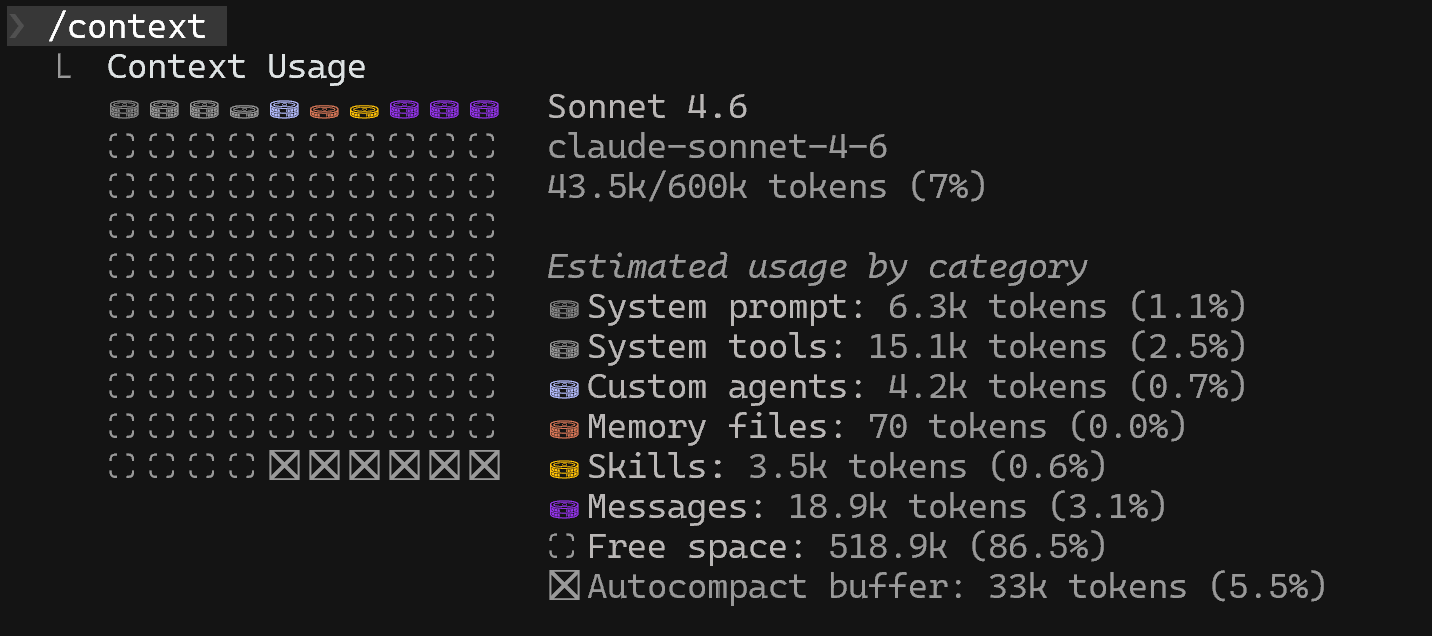
Running /context command in Claude Code is a perfect way to get a sense of token consumption
However, running /context tends to become pretty annoying after some time because it interrupts your workflow. A more developer-friendly approach is to set up a status line — For ongoing visibility, you can configure a persistent token counter directly in your terminal prompt. The official Claude Code docs cover the built-in option at https://code.claude.com/docs/en/statusline. For a more polished setup — with powerline support, themes, and customization — the community-built ccstatusline is worth a look. Either way, live token counts visible at all times remove the need to remember to check.

Defining a custom status line will always display the current number of tokens in the context window without any distraction
A Note on the 100k Limit
The specific thresholds discussed here — 80k as an optimum, 100k as a ceiling — are not hard limits. As models evolve, the performance gradient will shift.
But the fundamental principle will likely remain true for any transformer-based architecture: cognition decreases as context accumulates. The attention budget is finite. Working with that constraint rather than against it is what separates developers who get reliable results from AI coding tools from those who blame the model.
Context engineering is not about using fewer tokens. It's about using the right tokens, at the right time, while the model is still at peak attention.